AI case processing for hospitals · From referral to audit
Read · Source · Check · Sign off
Aiomics reads the documents that arrive with every hospital case, links the information to its source and prepares the admission decision, the letter and the reply to the insurer for professional sign-off.
Scroll sideways to see every column.
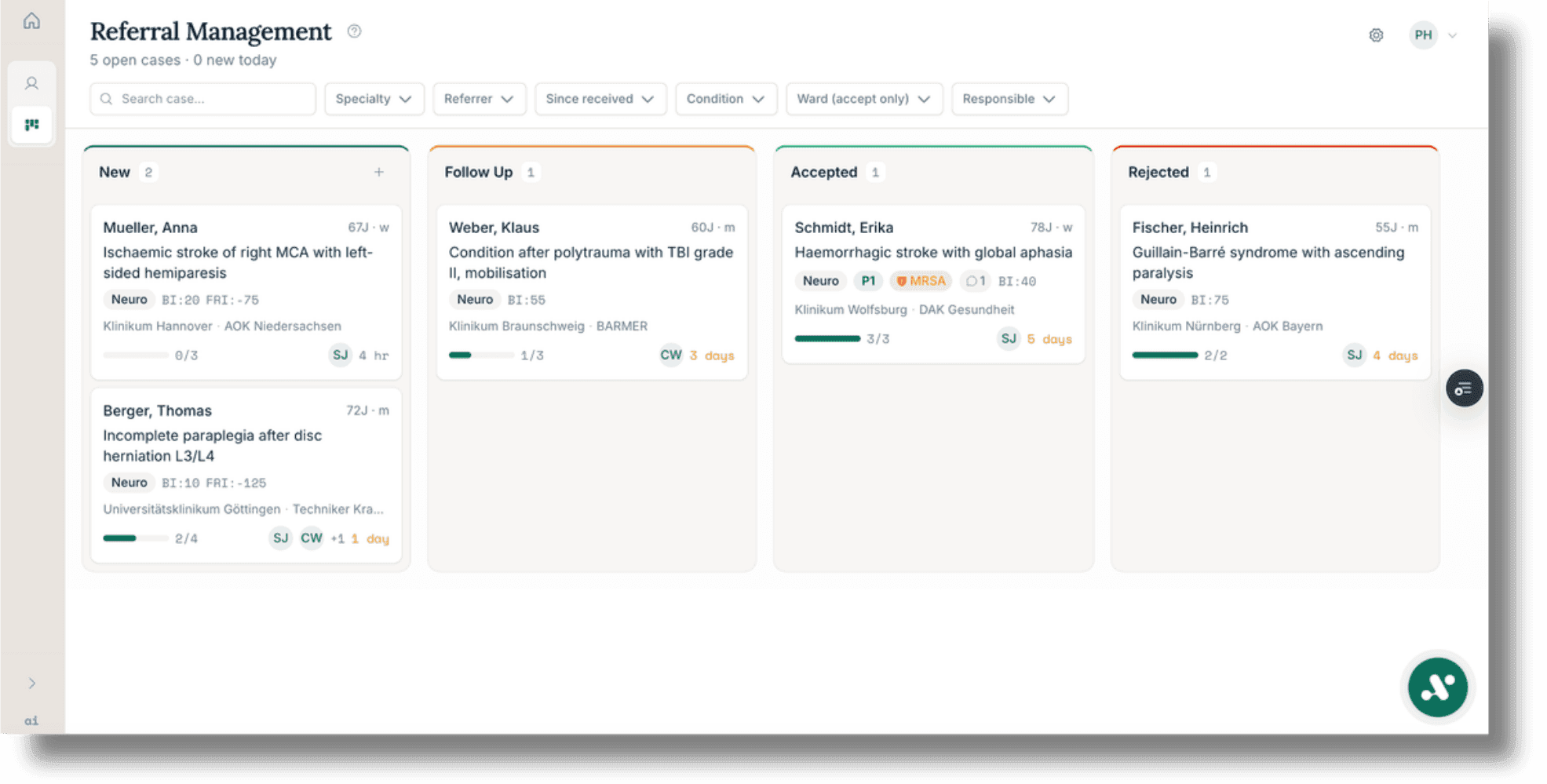
Admission management with sample data: referrals from arrival to decision, with document status and ownership.
Admission management in detailAs of October 2026
- about 5,000
- patient cases processed since January 2026, at sites of a large German hospital group
- ISO/IEC 27001:2022
- information security, certified by TÜV NORD CERT
- EU
- processing exclusively within the European Union
- Charité
- independent evaluation, ongoing
Four steps from arrival to sign-off
Steps 2 and 3 run on integrOS, the verification layer of aiomics: it records where information came from and compares reports and physician letters with their sources. Step 4 stays with a person.
Read
Fax, scan, PDF, dictation or questionnaire: the platform recognises the text on every page, assigns the document to the right case and turns it into structured information. A person confirms the match.
- Upload whole stacks of records for several cases at once
- Split bundled transmissions into single documents
- Flag illegible pages and missing attachments
Source
Structured information keeps its source: the document and the passage it came from, one click away.
- Original document and processed version side by side
- Notices where sources contradict each other
- Machine-generated content marked as such
Scroll sideways to see the whole illustration.
Check
For reports and physician letters, a separate review pass compares the draft with its sources. References that the sources do not support are removed, and the draft is written again.
Short standard letters started from the boards (acceptance, rejection, requests for documents) get a reference check only. A checked draft can still omit or misstate information; that is why step 4 follows.
- Missing mandatory entries flagged before sending
- Drafts follow the hospital's templates and letterhead
Sign off
A physician or the responsible professional signs off every document, and can check any sourced statement against its source in one click.
Whoever signs off carries the responsibility for the document and decides how much to check against the source.
- Unchecked AI content visually set apart
- Further sign-off stages to match the hospital's process
- A record of who changed what, and when
Scroll sideways to see the whole illustration.
Five modules for the work on a case
The modules work on the same case and the same sources. A hospital introduces them one at a time, starting with one workflow.
Admission management
Status: liveKnow what a referral is still missing
Referrals arrive as faxes, scans or PDFs, often without all their attachments. Aiomics reads them, assigns them to the case and shows the admission team, on one shared board, what has arrived, what is missing and who is responsible.
Admission management in detailThe work
- Sort incoming referrals
- Request missing documents
- Prepare acceptance, rejection or query
- Draft the admission report
- Justify extension and cost-coverage requests
Scroll sideways to see the whole illustration.
Letters and reports
Status: live · DRV and statutory insurersLetters drafted from the case file, on your letterhead
Aiomics drafts physician letters and discharge reports from the case documents, using the hospital's templates and each physician's own style. Before sign-off, the draft goes through the review pass described in step 3.
Letters and reports in detailThe work
- Draft physician letters and discharge reports from the case documents
- Use the hospital's templates and letterhead
- Open the source of a statement in one click
Scroll sideways to see the whole illustration.
Insurer disputes
Status: liveSourced replies. Deadlines in view.
When an insurer or the Medical Service raises a query, aiomics assembles the documents that answer it and drafts the reply with its sources in the record. The deadline sits on the same board.
Insurer disputes in detailThe work
- Answer insurer queries
- Assemble the documents an audit needs
- Track deadlines
- Record the outcome per argument
Scroll sideways to see the whole illustration.
Patient questionnaires
Status: livePatients' answers, filed with the right case
The hospital builds its own questionnaires. Patients answer them on a tablet or by link, and the answers sit in the case alongside the other documents. Group-level analysis is planned.
Patient questionnaires in detailThe work
- Build questionnaires
- Collect them on a tablet or by link
- Assign answers to the case
Record-based billing
Status: in test with the billing partnerPrivate billing, prepared from the record
For services billed under the private fee schedule, aiomics prepares the service details from the record for billing, each with its source. A billed item can then be traced back to the record.
Record-based billing in detailThe work
- Prepare service details and their documentary support for private billing
Capabilities and their status
What is live today, what is in test, what is set up per site and what is planned.
Read: capture documents
Stack upload
Documents for several cases in one operation
Text recognition
Scanned and photographed pages become machine-readable
Document splitting
Bundled transmissions are separated into individual documents
Case matching
A proposed case match, confirmed by a person
Data-quality checks
Flags illegible pages, missing attachments and contradictory entries
Dictation
in testVoice input directly in the field, with a correction step
Fax intake
per siteReroute faxes to a digital inbox and from there to the case board
Source and check
Source view
Original document and processed version side by side
Source references
Structured information leads to the document and the passage
Review pass
Reports and physician letters are compared with their sources; references the sources do not support are removed
Reference check
Short standard letters started from the boards (acceptance, rejection, requests for documents) get a reference check only
Divergence notices
Notices of differences between the supplied sources
Gap notices
Missing mandatory entries are flagged before sending
Draft marking
Unchecked AI content is visually set apart
Short path
plannedA shorter workflow for recurring documentation tasks, with sign-off
Timeline
plannedEvents recorded in the case documents in a dedicated chronological view
Lab values
plannedRecorded lab values by organ group, with the stated reference ranges and changes over time
Medication overview
plannedConsolidated from the available sources
Coordinate cases and tasks
Admission board
Incoming referrals from enquiry through to admission
Case card on your own terms
The fields your hospital defines: travel distance, payer, referring practice, registered care needs, notes from the documents such as multi-resistant organisms
Bed-management board
Bed and appointment planning in the same system
Case dialogue board
Insurer correspondence with deadlines and status
Role views
Each profession sees the columns its work requires
Ownership
Every card has one responsible person
Comments
Queries stay on the card, linked to the case
Change history
A record of who changed what, and when
Discharge board
plannedResponsibilities, dates and documents for a discharge decided by the care team
Write letters and reports
Report drafts
Drafts of physician letters and admission reports from the case documents
Discharge letter
in testDraft from the case documents, at one site
Templates and letterhead
More than 100 templates for rehabilitation and acute care, cut to your hospital's documents, on the hospital's letterhead
Personal style
Drafts follow the physician's own way of writing
Form completion
Proposed field content drawn from the record on file
Rehabilitation reporting (DRV)
Discharge reports and extension requests for the German statutory pension insurance
Insurer letters
Drafts for statutory and private insurers, with their sources in the record
Complex treatments and OPS
Prepare progress notes and recorded services for supporting documentation; specific OPS checks are planned
Patient letter
Report content in accessible language, for sign-off before it is shared
Expert opinions
in testTemplates for assembling existing findings and recorded medical assessments
Encounter documentation
in testStructured drafts from recorded conversations
Insurers and billing
Case dialogues and preliminary proceedings
Reply drafts with their sources in the record
Medical Service audits
Contesting, discussion and litigation stages in one place
Deadline tracking
Deadlines under the audit procedure agreement in view
Outcome per argument
Record the result of a proceeding per argument
Documentation for coding review
Prepare recorded information and its sources; further ICD-10-GM and OPS support is planned
Extension requests
Reasoning drawn from the documentation on file
Record-based billing (GOÄ)
in testService details with their sources for private billing, with the billing partner
Private-fee checks
plannedExclusions, reductions and multipliers through fixed rules
Case-law references
plannedPointers to the relevant decisions
§ 301 data check
plannedChecking the data before the hospital information system transmits it
Involve patients and referrers
Questionnaires and surveys
liveYour own instruments for patients, relatives and staff, at the bedside or at home
Admission questionnaires
in testStructured information ahead of the appointment
Measurement waves
in testMeasurement points by calendar or by admission and discharge
Patient portal
plannedDocuments, appointments and forms for patients
Referrer portal
plannedReferring practices and hospitals submit documents digitally
Security and traceability
EU processing
Processing exclusively within the European Union
ISO/IEC 27001:2022
Information security, certified by TÜV NORD CERT
Roles and permissions
Access by function and by area
Sign-off stages
Additional sign-off stages to match the hospital's process
AI labelling
Machine-generated content is marked as such
Audit log
in testSystem-side logging of actions
Connect and introduce
Runs in the browser
Nothing to install on your computers
Agreed handovers
Hand results to your systems as a file or a copy
HL7 v2
per siteConnection to your source system, assessed and built for your hospital
FHIR R4
per siteInternal data model; external data exchange is set up and tested for your hospital
Watched folder
per siteSetting up and running a monitored directory
Scanner connection
per siteTake over scanned documents directly
Laboratory connection
per siteLDT 3.0 for findings and orders
Start Path portal
A protected portal that guides the internal project lead through the five phases of a rollout; free for client hospitals
Rollout material
Ready-made documents for each phase, from the invitation to the executive board to the works council briefing
Unmarked: live at customer hospitals. In test: at individual sites or with a partner. Per site: assessed and set up for your hospital. Planned: not yet in use.
Planned extensions
Course documentation
Keep ongoing ward documentation in the same case, so its entries are ready for the discharge letter.
Coding
Coding suggestions for the relevant payment system, drawn from the documented record, each with its source.
Quality reports
Analyse data collections at group level and draft reports for quality management, with case numbers, completeness and limits of interpretation.
Referrer portal
Referring practices and hospitals submit documents digitally, straight into the right case.
Operational analytics
Turnaround times, admission rates and referral sources. The hospital sets purpose, access rights and minimum group sizes before use.
Connecting to your systems
Aiomics runs in the browser, with nothing to install on your computers. A first workflow starts with the routes that exist today.
Today
- Upload files, including whole stacks of records
- Reroute faxes to a digital inbox
- Hand results over to your systems by agreed routes, such as a file or a copy
Built per site
- Direct interfaces to the hospital information system, for example via HL7 v2 or FHIR
- Connections to laboratory, scanners and watched folders
We build most direct interfaces for the individual site. Before committing, we clarify source and destination system, data fields, direction and operational ownership. The trial also measures the time spent on confirmation, correction and handover.
Less searching. Less writing. More medicine.
Let's talk about the first workflow in your hospital.
Book a conversation